Showing posts with label tweak tools. Show all posts

Tuesday, 11 February 2014

How To Change MAC Address Easily (Windows)


What is MAC address? Mac address is a physical serial number and every networking devices include your personal computer has a MAC address. MAC address also can give out other user on your network about your computer name and some info like computer model, network card type, and your Internet Protocal (IP) address. For more info : Google yourself..
Mac Address Changer
1. Download software :-
Links : [MEGA]
           [DROPBOX]
           [GDrive]

2. Install the software like usual. (Run as administrator)

3. Click NO for registration and you'll see a message "successfully installation".
 "Click NO"
"Click OK"

4. Locate the program installed in All Programs. AnalogX > AnonyMac > AnonyMac.exe (Run it)

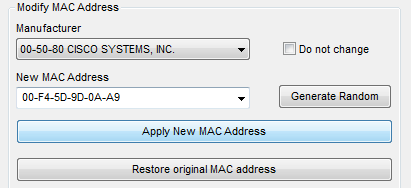
5. Setup with the adapter you're using to connect to internet. Restore to original if problem occurs.
"Use at your own risk"

Tuesday, 17 December 2013

How To Fix Logon Failure Account Currently Disabled (Windows XP)


This tutorial will teach you how to troubleshoot the sharing problem between Windows XP to Windows 7 or Windows 8. Example : Windows XP cannot access Windows 7, cannot access printers, shared folder, logon failure or disabled.

a) Logon failure : account currently disabled.
 (\\cranberry is a Windows 7 computer name)

1. Download : Link Layer Topology Discovery (LLTD) for Windows XP (FIX)
Link : [MEGA]     [Dropbox]     [Google Drive]
Install it. v5 for Windows XP SP2 and older and v6 for Windows XP SP3.

2. Go to Control Panel.
3. Click on User Accounts.
4. Select user account. (note : for another user, you must do the same thing like this again)
5. Click on Manage my network passwords.
6. Click Add.
7. Add some info. (cranberry) is my computer name (W7 Home Premium) with shared folder.


Server : Add your computer name (Windows 7) which was sharing folder : \\servername 

User name : Username in the computer (Windows 7) you've created : servername\username

Password : Password in the local user/group (Windows 7) you've created.


About the username & password (add/delete user)
this in Windows 7 Home Premium, use netplwiz.exe
if you use Windows 7 Ultimate or Windows Server, please use gpedit.msc

8. You're done. Try typing \\servername or \\ipaddress in Run box.
Computer name is servername. Use \\servername to get access to shared folder. Make sure the security setting of shared folder is correct (permission) Check here : [Click Here].

=======================================================================================

b) Logon failure : Guest account is currently disabled.

1. Run "gpedit.msc"

2. Go to Windows Settings > Security Settings > Local Policies > User Rights Assignment. Then, find the "Deny access to this computer from the network" and remove Guest
After that, restart your computer.

Workaround :- if you use Virtualization (VMware, VirtualBox) mostly if you quick install you'll get the problem b) if you use "administrator" as a username. I suggest you download & install the FIX first. I hope my article helps you.

Watch Video
Saturday, 14 December 2013

UnlockRoot Pro v4.12 + Serials - 100th Post Giveaway

(100th post of this blog)
UnlockRoot Pro v4.12, Unlock Root is a software to help you root your Android device. The main function of this software is to obtain the highest user privileges. Supports as Samsung Galaxy S/SII/SIII, Note/Note 2, HTC One X, Amazon Kindle Fire, LG Nexus4, etc.

1. Download software  (version 4.12) + serial.
(Software + Serial) : [MEGA]   [Dropbox]
(Serial Only) : [MEGA]   [Dropbox]   [Google Drive]

2. Install the program. Open UnlockRoot Pro, then open serial.txt (copy and paste the serial in the box and click Go)
You're done (keep the serials for emergency)

About the download, I've zipped (compress the folder) twice so that (hosting website) will not delete the file, hopefully. No password, just extract like usual, the name of folder was renamed to a weird name so that "BOTS" cannot find this cracked software. 

Thursday, 12 December 2013

How to Check Computer Security Score


Check your computer security score easily using this software, this software will determine all sectors in your computer (Networking, Security, File Sharing, Backup, Management)

1. Download software.
Link 1 : [MEGA]
Link 2 : [Dropbox]
Link 3 : [Google Drive]

2. Install software (make sure run as administrator).

3. After that, the program will start and scan automatically.
This may took few minutes (if more than 5 minutes, try close (exit) the program and run again)
So, the score will be shown after finish scan.

To close the program, check your taskbar for the program icon, right click and click exit.


Wednesday, 11 December 2013

How To Create HTML Files Easily


Creating HTML is easy, if you know what you doing. For people like me, I'm also not so good in editing html (still learning). So today, I'm gonna show you the easiest way for lazy people like me editing HTML.

(Offline Method)
1. Notepad (Well most beginner user don't know, right?)

-Type anything in the notepad and save as (select type : All files) and make sure the last input is .html at the name.


-This is the standard html editor.. in history. Nowadays, there's ton of software for editing html.


(Online Method)
2. quackit.com (Easier, fun and you can even create tables, form, etc in html)

-Edit, create anything, put everything to the html easily, they even gave out to you some sample templates if you want (at the option)

-After you've finished editing, check at left top corner, click on "Source" and select all, copy and paste to notepad and save as .html format. (see first picture)


What the use of this html? For Website :-
Windows 7/8 Web Server : [Click Here]
Windows 7/8 FTP Server : [Click Here]

Saturday, 7 December 2013

How To Shutdown Computer with Timer (Shutdown Timer)


Shutdown your computer with a timer, this is very useful for people who loves to left their computer online or downloading something when they're are out from the house or anywhere. So, the computer will shutdown itself when the time-bomb is set by the user.
1. Download software. (No installation, just portable) Works on Windows 7 & Windows 8
Link 1 : [MEGA]
Link 2 : [Dropbox]
Link 3 : [Google Drive]

2. Double click the software and check your taskbar for the icon & double click the icon.

3. Now, set the timer, and click on Enable Timer. You're done.

The program has this option :-
a) PowerOff (Shutdown is same)
b) Reboot (Restart)
c) Logoff
d) Standby

You can set the timer using Local Time (clock on your computer) or Time-Bomb in hours or minutes.
Tips :-
To stop timer, click the Stop timer BUT to close program, go to taskbar, right click the icon and click Destroy.

Watch Video


Sunday, 1 December 2013

How To Reset Faronics Deep Freeze Password


Tested on : Faronics Deep Freeze v7 Standard
Forgot the password of Deep Freeze? Don't worry, lets bypass the password and create the new one.

1. Download software :-
Link 1 : [MEGA]
Link 2 : [Dropbox]
Link 3 : [Google Drive]


2. Run the software as administrator. Click on open new process, then click Start.

3. Left the password box BLANK, and click OK.

4. Go to Password tab and create new password, OK.

5. You're done. Restart PC, or log out (and log in again) to make the software take effect.
Q : Why restart or log out?
A : Because you will see the double icon of deep freeze in taskbar, to resolve it you'll have to restart or log out.

Watch Video